Running local AI LLM anywhere: from EC2 instances to Edge Devices
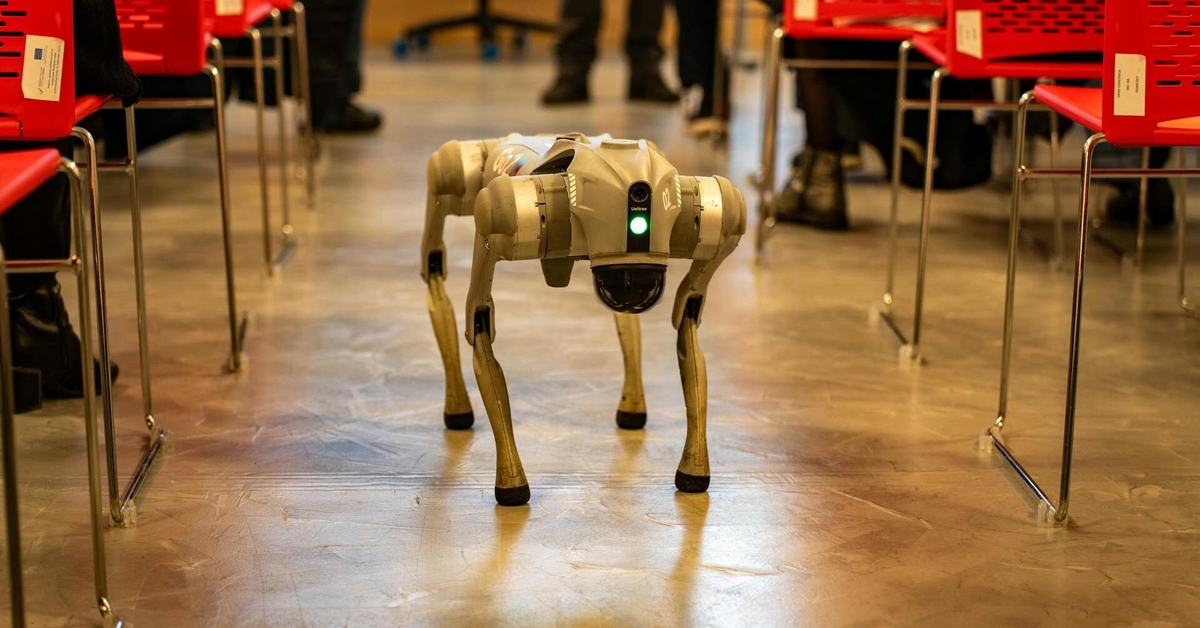
Llama.cpp is one of the most efficient frameworks for running Large Language Models locally. Written in pure C/C++, it is optimized for performance and low resource consumption, making it a popular choice for developers who want direct control over model inference without additional runtime layers.
It supports a broad ecosystem of open-source models, including Llama, Mistral, Gemma, Phi, Qwen, Falcon, Yi, Solar, and many others, while providing efficient execution across CPUs, GPUs, mobile devices, and edge hardware.
Benefits and use cases running Local Edge Device LLM
Having possibility to run LLM on Edge Devices opens multiple use cases:
- Minimal latency to inference, no 3rd party hops, man in the middle
- Operatable offline mode, local LLM does not require full-time Internet connection. Connection is needed for model updates or inferent results upload. System can stay year runing in ofline mode
- Edge device can perform inference and get results on a smaller/faster local model. Only in case if model results do not pass defined threshold the bigger more powerful model from Cloud can be used and called
- using quantization trained model can be compacted according to available resources of CPU and RAM
- embeddings calculation can be done on the edge side allowing integrate RAG and vector stores
- privacy: there is no Provider that is logging all requests and responses using your data and uses it for traing of next level model
- sensitive data is sent away from device to 3rd parties
- no celular or wifi needed
- infrastructure costs savings - there is no need to have big fleet of LLM inferences for all edge connections. Cloud model is used as a fallback when local LLM results are out of thresholds
Installation on ARM Edge hardware
Once you got SSH access to EC2 instance, follow this commands to install llamacpp:
1
2
3
4
5
6
git clone https://github.com/ggerganov/llama.cpp
cd llama.cpp
mkdir build
cd build
cmake .. -DCMAKE_CXX_FLAGS="-mcpu=native" -DCMAKE_C_FLAGS="-mcpu=native"
cmake --build . -v --config Release -j `nproc`
Installation on Android Devices
First install TERMUX emulator do device, then you can enable sshd service, and remotly connect to you device from any machine and run installation:
1
2
3
4
5
6
7
8
9
~ $ pkg upgrade -y
~ $ pkg install -y clang wget cmake git
~ $ pkg install -y clang wget cmake git
clang is already the newest version (21.1.8-2).
wget is already the newest version (1.25.0-1).
cmake is already the newest version (4.3.2-1).
git is already the newest version (2.54.0).
Summary:
  Upgrading: 0, Installing: 0, Removing: 0, Not Upgrading: 0
1
2
3
4
5
6
7
8
~ $ git clone https://github.com/ggerganov/llama.cpp
Cloning into 'llama.cpp'...
remote: Enumerating objects: 95392, done.
remote: Counting objects: 100% (80/80), done.
remote: Compressing objects: 100% (45/45), done.
remote: Total 95392 (delta 51), reused 35 (delta 35), pack-reused 95312 (from 3)
Receiving objects: 100% (95392/95392), 393.55 MiB | 13.94 MiB/s, done.
Resolving deltas: 100% (67912/67912), done.
1
2
3
~ $ cd llama.cpp
~ $ cmake -B build
~ $ cmake --build build --config Release
Download models GGUF
One of the key innovations in the llama.cpp ecosystem is the GGUF model format. GGUF was designed to optimize model storage and inference by supporting a wide range of quantization schemes that reduce the precision of model weights without significantly impacting model quality.
Instead of storing weights exclusively in FP32 or FP16 formats, GGUF allows models to be quantized to lower-bit representations such as 8-bit, 6-bit, 5-bit, or even 4-bit integers. This substantially decreases memory usage, reduces bandwidth requirements, and improves inference performance.
These optimizations enable modern LLMs to run efficiently on CPUs, including Arm-based processors, making local AI inference practical on laptops, edge devices, and other resource-constrained systems.
Here are few huggingface GGUF-models I have experimented with:
1
2
3
4
5
wget https://huggingface.co/Qwen/Qwen2.5-0.5B-Instruct-GGUF/resolve/main/qwen2.5-0.5b-instruct-q4_k_m.gguf
wget https://huggingface.co/unsloth/Llama-3.2-1B-Instruct-GGUF/resolve/b69aef112e9f895e6f98d7ae0949f72ff09aa401/Llama-3.2-1B-Instruct-Q3_K_M.gguf
wget https://huggingface.co/QuantFactory/SmolLM2-1.7B-Instruct-GGUF/resolve/main/SmolLM2-1.7B-Instruct.Q3_K_M.gguf
wget https://huggingface.co/Qwen/Qwen2.5-0.5B-Instruct-GGUF/resolve/main/qwen2.5-0.5b-instruct-q4_k_m.gguf
wget https://huggingface.co/sensura/Qwen3-0.6B-Q3_K_M-GGUF/resolve/main/qwen3-0.6b-q3_k_m.gguf
Quantization
Consider the model file Llama-3.2-1B-Instruct-Q4_K_M.gguf. Each part of the name provides information about the model architecture, size, and quantization level.
The most important component for inference efficiency is Q4_K_M. The Q4 indicates that the model weights have been quantized to 4-bit precision, meaning each parameter requires only 4 bits of storage instead of the 16 bits typically used by FP16 models. The K_M suffix refers to a specific quantization scheme used by llama.cpp that balances model quality and performance.
By reducing the precision of billions of model parameters, quantization dramatically decreases both model size and memory requirements. As a result, models that would otherwise require several gigabytes—or even hundreds of gigabytes for larger parameter counts—can run on consumer hardware with significantly less RAM while maintaining good inference quality.
Start LLM server llama.cpp
1
$ ./llama.cpp/build/bin/llama-server -t 4 -m models/Llama-3.2-1B-Instruct-Q4_K_M.gguf --host 0.0.0.0 --port 9090 -np 1
To run llama with mcp servers support additional key should be used:
1
$ ./llama.cpp/build/bin/llama-server -t 4 -m models/qwen2.5-0.5b-instruct-q4_k_m.gguf --host 0.0.0.0 --port 9090 -np 1 --webui-mcp-proxy
To run llama with support of embeddings endpoint;
1
./llama.cpp/build/bin/llama-server -m models/qwen2.5-0.5b-instruct-q4_k_m.gguf -t 4 --host 0.0.0.0 --port 9090  --embeddings --pooling cls
llamacpp has built in OpenWEB UI frontend
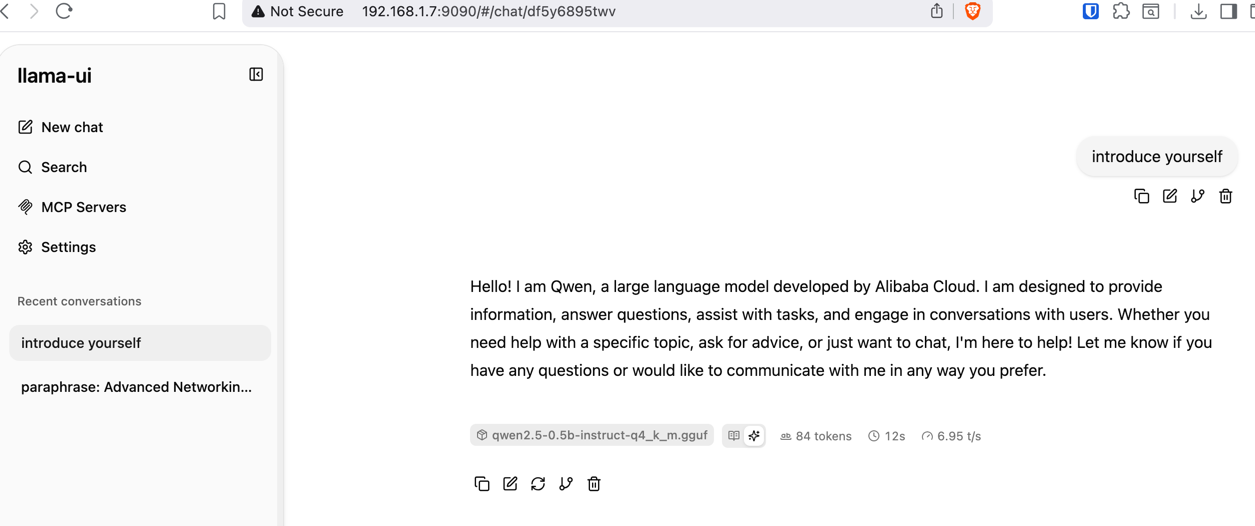
Here are results running qwen2.5-0.5b-instruct-q4_k_m.gguf model on extra small ARM instance, where is free 1G RAM:
Here are resuls running same qwen2.5-0.5b-instruct-q4_k_m.gguf model on Android phone that has 8Cores and 8GB RAM:
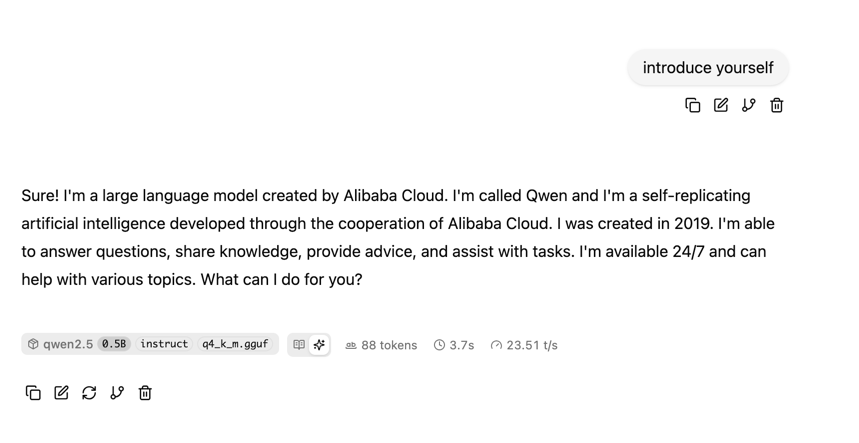
Token speed dramatically differs.
Connect OpenAI client to Model
With this framework you can use available models, host them even on your Android phone. Now having your local AI running same SDKs can be used to work with it, with just few parameters adjustment (URL, KEY, MODEL_NAME):
1
2
3
4
5
6
7
8
9
10
11
12
13
14
15
16
17
18
19

from openai import OpenAI

if __name__ == '__main__':
    client = OpenAI(api_key="dummy",
                    admin_api_key="dummy",
                    base_url="http://127.0.0.1:9090/v1",
                    )

    response = client.chat.completions.create(
        model="qwen2.5-0.5b-instruct-q4_k_m.gguf",
        messages=[
            {"role": "user", "content": "introduce yourself"}
        ]
    )

    print(response.choices[0].message.content)
1
2
As an artificial intelligence language model, I am Qwen and I was created by Alibaba Cloud. I am a language model designed to assist users in various tasks such as writing, communication, and processing text. I am programmed to understand, generate, and respond to text, and I am constantly learning and improving based on the data I have been trained on. I am here to help and to support you in any way that I can.
here are detailed results of model execution:
1
2
3
4
5
6
7
8
9
{
    "messages": [
        {
            "content": "introduce yourself",
            "role": "user"
        }
    ],
    "model": "qwen2.5-0.5b-instruct-q4_k_m.gguf"
}
1
2
3
4
5
6
7
8
9
10
11
12
13
14
15
16
17
18
19
20
21
22
23
24
25
26
27
28
29
30
31
32
33
34
35
36
{
    "choices": [
        {
            "finish_reason": "stop",
            "index": 0,
            "message": {
                "content": "As an artificial intelligence language model, I am Qwen and I was created by Alibaba Cloud. I am a language model designed to assist users in various tasks such as writing, communication, and processing text. I am programmed to understand, generate, and respond to text, and I am constantly learning and improving based on the data I have been trained on. I am here to help and to support you in any way that I can.",
                "role": "assistant"
            }
        }
    ],
    "created": 1780758287,
    "id": "chatcmpl-eZuyspAITmOmnYdCQf5blxdQGJviy41W",
    "model": "qwen2.5-0.5b-instruct-q4_k_m.gguf",
    "object": "chat.completion",
    "system_fingerprint": "b9295-95405ac65",
    "timings": {
        "cache_n": 0,
        "predicted_ms": 4865.387,
        "predicted_n": 88,
        "predicted_per_second": 18.08694765699008,
        "predicted_per_token_ms": 55.28848863636363,
        "prompt_ms": 557.404,
        "prompt_n": 32,
        "prompt_per_second": 57.4089888124233,
        "prompt_per_token_ms": 17.418875
    },
    "usage": {
        "completion_tokens": 88,
        "prompt_tokens": 32,
        "prompt_tokens_details": {
            "cached_tokens": 0
        },
        "total_tokens": 120
    }
}
Let’s now run Llama3.2 model:
1
$ ./llama.cpp/build/bin/llama-server -t 4 -m models/Llama-3.2-1B-Instruct-Q4_K_M.gguf --host 0.0.0.0 --port 9090 -np 1 --webui-mcp-proxy
1
Hello, I'm an artificial intelligence model known as Llama. Llama stands for "Large Language Model Meta AI."
1
2
3
4
5
6
7
8
9
10
11
12
13
14
15
16
17
18
19
20
21
22
23
24
25
26
27
28
29
30
31
32
33
34
35
36
{
    "choices": [
        {
            "finish_reason": "stop",
            "index": 0,
            "message": {
                "content": "Hello, I'm an artificial intelligence model known as Llama. Llama stands for \"Large Language Model Meta AI.\"",
                "role": "assistant"
            }
        }
    ],
    "created": 1780758446,
    "id": "chatcmpl-kTksGv3J8zKpesmhjNzf7NWRUQTdYYUR",
    "model": "Llama-3.2-1B-Instruct-Q4_K_M.gguf",
    "object": "chat.completion",
    "system_fingerprint": "b9295-95405ac65",
    "timings": {
        "cache_n": 0,
        "predicted_ms": 1736.759,
        "predicted_n": 25,
        "predicted_per_second": 14.394628155086572,
        "predicted_per_token_ms": 69.47036,
        "prompt_ms": 1286.379,
        "prompt_n": 38,
        "prompt_per_second": 29.540283229126096,
        "prompt_per_token_ms": 33.85207894736842
    },
    "usage": {
        "completion_tokens": 25,
        "prompt_tokens": 38,
        "prompt_tokens_details": {
            "cached_tokens": 0
        },
        "total_tokens": 63
    }
}
Benchmark
When running llama.cpp on Android devices, it is important to understand the underlying ARM CPU architecture. An octa-core processor does not mean eight equal-performance cores. Most modern mobile chipsets use a big.LITTLE design that combines a small number of high-performance cores with several power-efficient cores.
For LLM inference, the highest performance is not always achieved by using all available cores. Additional efficiency cores can introduce scheduling overhead and may contribute less computational power, resulting in lower token generation rates than a configuration that uses only the high-performance cores.
The best approach is to benchmark your device with different thread counts and compare tokens-per-second performance. Once you identify the optimal configuration, tune llama.cpp accordingly to maximize inference speed and overall efficiency.
1
~ $ ./llama.cpp/build/bin/llama-bench -t 4,6,8 -m models/Llama-3.2-1B-Instruct-Q4_K_M.gguf  -p 128,256,512 -n 64
| model | size | params | backend | threads | test | t/s |
|---|---|---|---|---|---|---|
| llama 1B Q4_K - Medium | 762.81 MiB | 1.24 B | CPU | 4 | pp128 | 46.43 ± 0.23 |
| llama 1B Q4_K - Medium | 762.81 MiB | 1.24 B | CPU | 4 | pp256 | 49.40 ± 0.38 |
| llama 1B Q4_K - Medium | 762.81 MiB | 1.24 B | CPU | 4 | pp512 | 50.47 ± 0.33 |
| llama 1B Q4_K - Medium | 762.81 MiB | 1.24 B | CPU | 4 | tg64 | 14.35 ± 0.06 |
| llama 1B Q4_K - Medium | 762.81 MiB | 1.24 B | CPU | 6 | pp128 | 51.29 ± 0.25 |
| llama 1B Q4_K - Medium | 762.81 MiB | 1.24 B | CPU | 6 | pp256 | 54.54 ± 0.55 |
| llama 1B Q4_K - Medium | 762.81 MiB | 1.24 B | CPU | 6 | pp512 | 55.42 ± 0.21 |
| llama 1B Q4_K - Medium | 762.81 MiB | 1.24 B | CPU | 6 | tg64 | 14.13 ± 0.04 |
| llama 1B Q4_K - Medium | 762.81 MiB | 1.24 B | CPU | 8 | pp128 | 50.08 ± 1.49 |
| llama 1B Q4_K - Medium | 762.81 MiB | 1.24 B | CPU | 8 | pp256 | 57.29 ± 0.37 |
| llama 1B Q4_K - Medium | 762.81 MiB | 1.24 B | CPU | 8 | pp512 | 58.07 ± 0.48 |
| llama 1B Q4_K - Medium | 762.81 MiB | 1.24 B | CPU | 8 | tg64 | 14.36 ± 0.15 |
Limitation
When running from cli from termux emulator on Android, Edge device or EC2 instance, there is limitation that GPU resources are not available for c++ code, so inference is done only using CPU resources. But for some Edge ARM bare-metal devices llamacpp has support for cuda and can inference using GPU, which should give better tokens speed.
I have tried running llamacpp with few models on Android device - it runs smooze and the performance is higher compared to ARM-based IoT devices (but this is due to ARM chipset architecture). However, on DataComputation intensive tasks, you can obser that the rate of CPU is fully utilized - thus screen can blink during tokens generation. Such sideeffects will gone when you offload LLM to GPU benefits, check that you hardware is in a supported list. Other alternative can be Litert-lm framework that is natively supported by google and allows invoke LLM on Android devices in CPU and GPU.
Links:
- https://llama-cpp.com/
- https://github.com/google-ai-edge/gallery/blob/main/Android/src/app/src/main/assets/skills/text-spinner/SKILL.md
- https://github.com/google-ai-edge/LiteRT-LM/blob/main/docs/api/kotlin/getting_started.md
- https://github.com/vladimirvivien/llm-go/blob/main/litertlm-intro/weather-tool-chat/weather.go
- https://medium.com/@vladimirvivien/litertlm-go-on-device-llm-inference-with-go-and-googles-litert-lm-07241f431a8e
- https://developers.openai.com/api/docs/guides/agents/models
- https://developers.openai.com/api/docs/guides/agents/models
- https://developers.openai.com/api/docs/quickstart
- ARM: https://learn.arm.com/learning-paths/servers-and-cloud-computing/deepseek-cpu/deepseek-chatbot/
- adnroid ssh: https://wiki.termux.com/wiki/Remote_Access
- ollamacpp benchmark: https://turingpi.com/run-llm-locally-arm-rk3588-ollama-llama-cpp/
- ai galery: https://github.com/google-ai-edge/gallery
- openclaw android https://github.com/Mohd-Mursaleen/openclaw-android
- llm on android: https://geekymd.me/blog/running-local-llm-on-android
- llm on mobile: https://farmaker47.medium.com/run-gemma-and-vlms-on-mobile-with-llama-cpp-dbb6e1b19a93
- arm developer: https://learn.arm.com/learning-paths/servers-and-cloud-computing/ai-agent-on-cpu/set-up/
- hugging faces: https://huggingface.co/models?library=gguf
- https://alain-airom.medium.com/a-first-experience-with-llama-cpp-cac181c64461
- edge AI article: https://pub.towardsai.net/your-edge-llm-is-memory-bound-trading-compute-for-bandwidth-to-hit-30-tokens-per-second-via-litert-eaaf8523eba1